Check out my blog to read all about day 4.
Gilberthorpe school

Showing posts with label DFI. Show all posts
Showing posts with label DFI. Show all posts
Monday, 10 August 2020

Monday, 16 September 2019
DFI 9 - Beating Around The Bush
A weird feeling with this being the last day of our intensive. What will the next challenge be? It's been great having the opportunity to delve in deep and soak like a sponge. It's highlighted that I thrive on that and in many ways need it.


Ubiquitous

Leaping into the learning pit:
Today I leapt in and became the learner. We often put our kids in assessment conditions and flippantly assure them "not to worry", "it'll be fine", etc...
To leap into that position as adults, many of whom in the room were rather nervous about the daunting task ahead of them... was actually a really valuable reminder of how it feels.
I had a few glitches while attempting the practice tests for modules on the certification site. Many of my problems were due to my nature of over-thinking. "Could it be that simple?" "Surely it's wanting more...?" Apparent;y it wasn't.
The Level One test was in two parts. One was multi-choice, with a scenario given and the number of answers which should be checked.
The other was actual tasks that we were required to go through, from creating a site with specific content to creating a YouTube playlist and sharing it with a specific audience.
The daunting part was dealing with Google Classroom, which I haven't used before. I found it easy to complete the actual tasks within that domain, however, it was hard for me to answer the multi-choice questions because I couldn't relate it to my own tangible experience. How often does this happen with our students, particularly those stepping up into Year 4 and suddenly working in a digital learning environment?
All in all... I passed!


So Many Opportunities:
Manaiakalani Innovative Teachers
- Focused on your Inquiry. Throughout the process, you design a tool to be used to support this Inquiry. A fabulous think tank experience to help develop your inquiry process. Great opportunities from this as well as the extra support.
Google Class On Air.
Throughout the year, you put up 16 episodes of learning in your classroom as well as the work that akonga present from it.
Tuhi Mai Tuhi Atu
Buddy classes from throughout New Zealand.
Online Toolkits
Term 4: October 22, 23, 24
Professional Learning, where you lead a toolkit in something that you are comfortable with sharing. It doesn't have to be absolutely amazing... just something.
Social Media
Keeping up with what's running already, such as professional blogs, Google + Community, Twitter etc.
What next?
The question of the day.
I've come to realise that I'm a creature that likes to be in the deep end and being challenged. I can't just paddle in the shallows. It has been invaluable being in such an intense learning environment for this past term. I need to keep the pressure on to keep learning.
- Google Certified Teacher Level 2
- I've committed to leaping in and giving this a go... what's the worst that can happen? I fail? (I'm forever telling the kids that it stands for First Attempt In Learning)
- Hapara Champion Educator
- I've submitted my application for this online course. The objective is to develop basic proficiency in the Hapara Suite—Highlights, Dashboard, and Workspace—from the point-of-view of a classroom teacher. Practice and reflect on positive, student-centred instructional use. While I've been using most of the features for years, I haven't been using workspace, so I'm interested in looking into this and how it can be harnessed for my practice.
- Could we be doing mini-interviews for everything that happens at school... then putting up a mini news bulletin, a simple iMovie, that is uploaded to blogs and Facebook at the end of every week.
- Next Year... there are a number of opportunities floating around. I need to "step into the arena".
Monday, 9 September 2019
Empowering: Learners & Teachers... and Me!
Connecting with Manaiakalani
We had the fabulous privilege to have Dorothy Burt leading us today. I always find that her perspective serves as a bit of a recharge.
Empowered
Learners and Teachers
Each of the 11 Manaiakalani communities has there own "why".
It began with the word "agency"... but that doesn't work within some of our communities, as the agencies that whanau are used to equate to various government Agencies... which equate to also turning their life upside down. Whanau interpretation is more important than ours.

It's important to not slip into a deficit model when talking about our communities. Despite the housing shortages and financial difficulties. Despite the outside influences that are impacting and adding stress.
5+ a day
Creating a dialogue with our kids, to develop their oral language, by bouncing the conversation backwards and forwards 5+ times. (Just like we want to create a thread with our blogging). This is a great strategy to combat the low oral language that our akonga arrive at our door with. By having deliberate conversations with the children we are effecting change in a positive way for them.
Google Forms
We went through a Chalk n talk to create a Google Form. It was great to be forced into amping up the use of it, rather than sticking to the tried and true. We created pathways etc, which was good to actually get stuck in and done.
Google My Maps
I'd never seen or used this before. pins can be dropped on actual maps, then pathways can by mapped, with distances measured etc.
Could use it at the beginning of the year to get kids to locate where they're from. Houses or countries.
Google Sheets
Protecting cells
Super Sheets! Using the Explore tool to work for you, creating graphs etc.
Tips & Tricks
- You can freeze more than one row by selecting the row first and then freeze up to row.... You can also "grab" the grey line and drag it to where to freeze to.
- Resize columns by highlighting the range. Then go to the top... double click on the blue line that appears. It'll allocate width due to length of word.
Getting Creative with Google Sheets
- Split name Add-on... when you have both names in one cell, you can split them into two columns (first and last names)
- Crop sheet Add on - to delete all the extra blank cells in a sheet, so that focus is drawn to what you're dealing with.
- Filtering for effective workflow and saving to utilise them
- Conditional formatting
- SPARKLINE adds a visual line to
- Macro Recorder... formatting a sheet and recording that, so that you can apply the same formatting to another sheet.
Students carry out a statistical inquiry about their blog.
Open a spreadsheet and gather some data.
What opportunities/provocations are there for 2020?
- Who would benefit from doing the DFI next year?
- Whoever is new to the Takitini Team!
- Whakatau Leader, to ensure that the pedagogy is embedded within the Whakatau team.
- To quote Brene Brown... I need to step into the arena!
- I'm interested in applying for Google Class on Air for next year.
- I want to consolidate some of the systems that hav'nt been working and have them more efficient to hit the ground running.
- Amp up creativity.
Monday, 26 August 2019
Enabling Access to supe up sites
We explored how to maximise our class/subject sites to maximise visible teaching and learning.
considering what works well and what doesn't work well.
Colour checker - put a link to your site and it will analyse points to consider.

We've been using google sites to repurpose our learning since 1:1 classes began.


 Think really carefully about Colour... you can you tools to pluck out colour from uniforms etc. Do the combinations make your eyes hurt? DO they look okay when viewed on different screens?

100-word challenge: put a google form with a picture prompt in. You can then pull them off easily.
Google form: find me an interesting fact.
Evaluating Class Sites:
We explored a selection of Class sites looking at the two key criteria of:- Visual appeal - shop window!
- User experience - easy to locate ‘stuff’ (2/3 clicks)
considering what works well and what doesn't work well.
Colour checker - put a link to your site and it will analyse points to consider.
Visible Kaupapa
Making teaching and learning visible... essentially can you see it or not? We aren't necessarily talking about John Hattie's work as he takes it to a whole new level which becomes quite complicated. Manaiakalani simplifies this. It's visible not only to learners but to whanau too.
FAIL - so much of the learning journey has traditionally been hidden from the akonga. Dorothy likens it to an adult version of a maze where you can only see a little bit in front of you.
It used to be that those that succeeded were the ones able to read the teachers mind. Those who had an element of cultural capital. When success criteria are open and displayed it opens up the learning journey and makes it visibly accessible. We can take it a lot further still with the intentional use of digital tools. Every step of the journey should be visible.

When we say that the default is visible, what genuinely needs to be invisible or private?Biodata (Date of birth etc), Health info, Behavioural data etc... sure, however what about assessment info? Five-year-olds know where they sit in relation to their peers. How precious do we need to be? We need to open our minds up about what genuinely must be kept private.
We've been using google sites to repurpose our learning since 1:1 classes began.

Making teaching visible removes the element of surprise for learners and whanau. It provides an advance warning as well as rewind ability afterwards.
Hapara's tagline is Making Teaching and Learning Visible. This is exactly what we are wanting to do. Effectively it enables us to be able to access the children's desk.
Hapara Parent Portal. DO our parents have the ability to access this?
Manaiakalani Google Class On Air
Stalk some teachers and see what it's like. At the end of this term, the applications for 2020 come online. Is this something we can get done down here? I'm seriously considering "stepping into the arena"
Visible Teaching as Inquiry
Having them open and visible across the clusters to access and learn from others, just like our learners. We stress the power of feedback and feedforward for our learners on their blogs. Do we do this ourselves with our own learning as professionals?
This connection only came about because they were visible online in a positive light for learning. A number of people argued that other communities were more impoverished/deserving, however, they didn't have a digital footprint.

Data shows that if a child is present over three years in a Manaiakalani School... the rate of gain in writing was twice that expected nationally. This means that these students on average made one more year's progress above the expected rate per year if they were there for three years.
A concern that when kids go digital, we lock parents out of our children's learning. Schools can create barrier systems to prevent ease of parents being able to find what they have been doing. By making everything visible and making it so that there is no problem with it being visible then we are keeping it open.
Leading Learning using a Google Site
An overview of setting up a class or subject site.
We need to consider the learners' pathways. It all needs to be connected so that kids find it easier to use when transitioning between classes and year levels.
When creating a new site... the first consideration is who are the learners? A site for Chromebook users is very different than a site that is for iPad users. Why are they using the site? What are the key things they are going to go to?

 Think really carefully about Colour... you can you tools to pluck out colour from uniforms etc. Do the combinations make your eyes hurt? DO they look okay when viewed on different screens?
Consider Layout... how easy is it on your eye? There's a lot to be said for clutter-free.
It's important to think about using a consistent font. Try not to use more than two. This goes for the things that you are embedding too. Google has begun to include Lexend fonts, which are meant to increase productivity. You can see that they are rather boring though...
The 3 click rule is very important. You should be able to get to anything within 3 clicks.
Purposeful Learning Tasks:

We need to consider how we can ramp up the learning task to utilise the tools available. It's not always "What can we do better?" but how can we redefine the way we are doing things to make it more purposeful and authentic.
For ERO etc, it's very easy to copy sites, so even if you are going to use the same site, it's a good idea to make a copy of it so that it archives everything nicely.
Feedback on our Group Sites
We provided a link to our class site. We received down and dirty feedback. Well... that was the theory. Everyone was actually rather kind. To be fair, many in the room are only starting out with their class sites, so a few kinks were still being ironed out. Ours, on the other hand, are humming as they should be. One of the things that have been frustrating me about mine is the clutter of rewindable learning. I had developed a bad habit of just "dumping" DLO's at the bottom f the page. They were there and rewindable, but the shop window was in disarray! Certainly not providing a visually appealing visual appearance to engage learners.
My feedback from the group was too "nice":
"It looks great. Thanks for sharing Mel."
"Well done Mel. I liked your simple layout and it is easy for children to use."
"Looks great Mel. I like the cleanness and few steps the kids have to go to."There was nothing I could use to set a goal for my class site for the day. I needed to come up with three specific things I wanted to achieve on my site today. My focus is on User engagement.
- Cleaner pages
- rewindable learning is clearly marked as per term.
- Less “busy-ness"
- I need it to be more engaging (insert magic wand of inspiration here)
- More “extra’s for expert” for kids to do at home.
I managed to clean a large portion up. It's much tidier and more user-friendly. I still need to be mindful of upping the engagement factor.
I finally got some links in there for literacy. I can just keep adding to this now... meaning kids have a place to go to when they are looking for "Homework" to do.
Sunshine Books:
Manaiakalani gets free copies of Sunshine books, to coincide with the online subscription. There are a huge wealth of resources out there to coincide with them.
Game changers:
Shift + Z - creates a ghost file in a different place.100-word challenge: put a google form with a picture prompt in. You can then pull them off easily.
Google form: find me an interesting fact.
Monday, 19 August 2019
DFI #5 Devices
Today at DFI, our guest facilitator was Lenva, who works 4 days a week for Hapara and the other day for Manaiakalani.
We refer to Cybersmart rather than Cyber Safe to teach our kids how to live in the world rather than be scared in the world. We want our kids to know how to deal with things as they come up and how to keep their own footprint as clean as they can.
One of the most important aspects of the kaupapa is that it is visible. It's all transparent and open.
Smart Learners
It's about being able to tackle different programmes and tackle different parts. Students learn the kawa of care, which is about teaching them to be responsible for their own device and who has access. It's crucial for the culture of looking after the tools for learning. Many assume that our learners know how to use the devices; however, they know how to use them in a different context. Often in a gaming "play/toy" context.Smart Footprint.
Term 2. The Create Term.This is where our learners begin to be seen. What do they want people to know about you? How do you want people to see you?
Smart Relationships.
Students interacting with the rest of the world. How do we speak on our (and others) blogs? If it's not positive, thoughtful or helpful then we are not going to say it. Authentic audiences and buddy class blogs encourage us to do this too.Hapara - Making Learning Visible.
Hapara allows us to focus on teaching rather than technology. Hapara is not really about monitoring and filtering. It's about supporting the teaching. The focus browsing and Filter sessions are for those few individuals who need extra support.
Some key tools:
- Sharing: All unshared documents, even those in folders.
- All Docs: Every document created.
- The only thing you cant see is empty trash, because who really does that?
- Filter Session: The opposite to Focus session. You can identify the sites you don't want them to go to.
- Comments: Shows all comments made and received by that student.
Workspaces. It can be embedded into the class site. Units can be visible to some students and not others. You can control what they see. They submit it back to the teacher.
Tamaki College is currently undertaking all of their NCEA exams within a focus browsing session and students submit their work upon completion.
Chromebooks
It was all about finding the best device for learning for EVERY young person.
Partnership
- Ownership of the Chromebook is a partnership. Often it becomes a family tool. Thus it is not only empowering students but whanau as well. They look after the device better if they own it, rather than when it's a school-owned device.


Participation
- Bringing the device to school every day charged.
- Because they are all using the same device, it empowers the teachers to work confidently with them.
Protection
- It should be seamless. Everything should just happen and be visible.
- The important things are behind the scenes.
- By teaching a Cybersmart curriculum then we are assisting students to make good choices about what to do when things go awry.
Its a really good idea to go through the Digital Dig so that you know how to assist students with workflow.
 |
| Check it out here |
iPads
Apple Classroom works similar to Hapara, but for iPads.
It's vital that the routines are established right at the beginning. If they are established young, then they have them for life.
 |
| Visible Teaching and Learning |
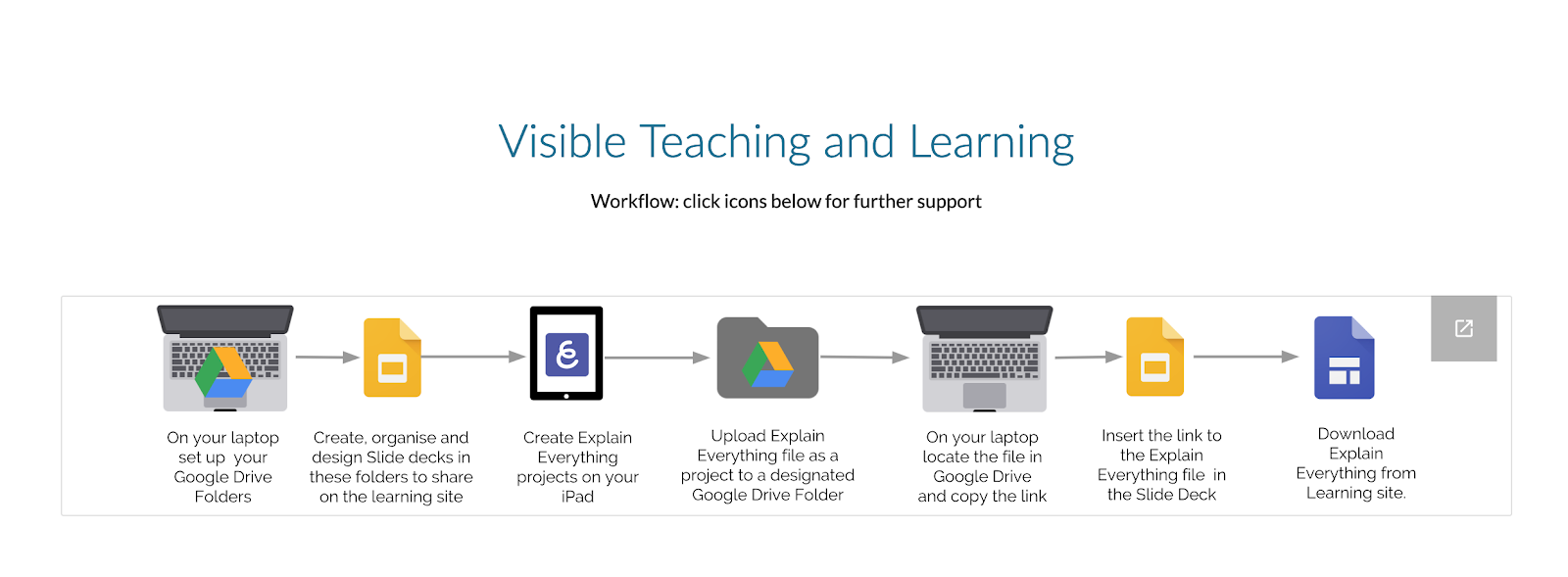
By embedding a link to your Explain Everything on a slide, you can put in easily on your slide.
To view on your Mac, download the Explain Everything Viewer (which sits in your Appa)
Screencastify
We created a Screencastify on how to use a tool. I took the opportunity to create one to share the differences between Onetab and Mini Toby, which we looked at a couple of weeks ago when covering Workflow. My learners use this easily and happily. As adults, I think we are often hesitant to record ourselves. There are so many uses for this tool.
Tuesday, 13 August 2019
Computational Thinking
Share - Tohatoha
We need to mindful that it's not just the great things that we share, but the reality too. Some times our perceived failures are the things that we learn most from. Sharing is what makes us human. Sharing our successes. Sharing our failures. F.A.I.L = First Attempt In Learning.Youtube was born in April 2005. Social media spaces sprang up... Facebook... Bebo... Twitter... The taglines that they all chose to put with each space was "share your life" in some way shape or form. It opened up the world and the way that we share. 2005 brought speed and amplification to the way that we share.
Remind ourselves of our Manaiakalani goals. "Work with learners to establish an authentic audience for their learning outcomes." - Raise Achievement outcomes.

Authentic audience... gone are the days of the audience being a teacher at night with a red pen in hand. Natasha from Hornby High is a student who blogged about Vans. She sent the post to Vans and they commented! She made an authentic connection!
This connectivity is within the realms of every individual who has access to the internet. We need to utilise it to excite and accelerate our learning. Our kids are often limited in the connections that they make in person. Some often don't go many places beyond home and school. This is their vehicle out!
Blogger
Blogger was chosen for a number of reasons. In the beginning, a number of options were explored. Blogger won hands down.- Resembles the spaces our young people want to be on: While it may not be the coolest place that young people want to be, it functions very well to do all the things it needs to do.
- Able to provision this legally, systematically & securely. The board of Trustees is the legal owner of the student blog. The student is merely the author. This gets around the age constraints and legalities of the blog.
- NO new sign in required for GSuite users... no new list of usernames and password.
- Guarantee that there's a three check system. These are mechanisms for us managing the safety of our children online.
- Blog posts and comments go to Hapara Teacher Dashboard for teachers to check.
- The teacher who is responsible for that blog gets emails to notify them.
- Gadget on the side of the class blog, that lists the class blogs. Make the setting so that the most recent post goes on top.
Cybersmart Curriculum
It's okay for students to be operating online, but they MUST be taught the cybersmart curriculum in order to ensure that they have a positive presence online. Providing an ability to connect with each other in a respectful way.
A lot of the other spaces are great. The benefit of Blogger is that it's within the google suite, so no further password or sign in is required.
Share to finish learning
An eternal frustration, particularly in lower decile schools. It can encourage akonga to celebrate being "finished". They just move from one job to the other and then move onto the next without finishing one off properly. This can be a lifelong habit which transfers into their work habits post-school.
The process of 'Share to Learn' becoming a spiral is extremely important. Not only sharing to finish, but sharing to begin learning.
(Slide 18) "Positive thoughtful Helpful" - links to John Hattie and Feedback & Feedforward.
By embedding this language all the way through, it cements it and becomes a natural way of being. By embedding this it gives our kids a toolkit of how to behave, both online and offline.
We need to teach our kids some tricks to hook in their audience. You can't just be passive about sitting back and waiting for it all to happen.
Even reading and commenting on each other's blog has the ability to accelerate learning.
Every lingerer on a blog registers with googles algorithm. If you linger, it'll be noticed.
Kawana - OMGTech - He's the Course creator in the background.
Pam Fergusson Charitable Trust. She was a paraplegic who mortgaged her house to buy a computer because she saw that was the future. Her boys now are all computer programmers and run a multi-million dollar company.
Technology in the world we live in. It's about connections and who you know. Our kids need to have the ability to make connections.
Boston Dynamics Big Dog - ethics... it was funded by the military. It isn't just for war, but for rescues etc
Sophia the robot - Singing with Jimmy Fallon.
The algorithm adjusts within the song to match pitch. It has learned by itself. Sophia absorbed the knowledge. Can robotics be creative?
The algorithm adjusts within the song to match pitch. It has learned by itself. Sophia absorbed the knowledge. Can robotics be creative?
Skin Vision - $80/year. Consumer Institute wasn't positive about it, however, the more people who use it the better the algorithm gets. Getting a body scan for moles is around $200... Could become a new party trick?
Cost becomes a barrier.
Zephyr's Cora - Self-flying planes.
Tech ethics...should we do it?
The new content covers two key areas, computational thinking and designing and developing digital outcomes. It has been designed to be flexible, so it can respond to new developments and technologies as they emerge.
In fact, when Hon Nikki Kaye announced the curriculum in June 2017, she said:
“Computational thinking is about understanding the computer science principles that underlie all digital technologies and learning how to develop instructions, such as programming, to control these technologies.
Designing and developing digital outcomes is about understanding that digital systems and applications are created for humans by humans, and developing knowledge and skills in using different digital technologies to create digital content across a range of digital media. This part of the curriculum also includes learning about the electronic components and techniques used to design digital devices."
- Inquiry & Communication is the use
- Construction & Expression is the programming and create

Check out the glossary here.
Other stuff:
- cs unplugged - a huge resource of unplugged resources.
- Hour of Code. Limit to one hour or kids disconnect and check out
- Toxicode and silently teacher: when they've moved on from hour of code.
Scratch
Kiatakatu.ac.nz
Digital Readiness - It’s worth having a look at. You can complete a self-review, to guage where you are at with implementing the new digital curriculum. It has great resources for you to upskill or be informed.
I completed the online self-review tool to see where I was at, as a leader.


Makey Makeys
A-MA-ZING! Today was fantastic! I now feel like I've had a range of tools and ideas unleashed, but I've been able to have the sandpit time with them to successfully take them back into the classroom. I can see where a range of what we did today should be introduced to our akonga! It also involves critical literacy in that we are challenging our learners to consider the ethics of G-Tech and where things are heading, rather than being passive consumers of things that they are told about or introduced to.
I've already been on AliExpress and purchased a 3D pen, with filament!
Subscribe to:
Posts (Atom)